Showing posts with label Working process. Show all posts

Thursday, January 22, 2015

Storyline correction from Kristy

I have asked one of my friends from GD class Kristy, who was very good in English to help me in correcting the storyline in my final year project. She was trying to help me to reduce the text and correct the grammar of the sentence.


Before:


After:


There are a lot of refinements , very appreciate that she is willing to help.

Thursday, January 1, 2015

Digitize Progress (Chapter 1)


Finally, I have done all the digitize for my final project, the next step is to put interaction and trouble shooting the coding.

Saturday, December 13, 2014

Production day

Spending few days to animate my scenes in Adobe Edge. I have chosen the best font. 


I have downloaded several of free fonts in Dafont.com . I choose Dersu font because it fits into Japanese style.


I have separate the image that I want to animate in Adobe Edge. It's very simple and easy to execute to animate. I only spent few hours to animate the all the panels.

Friday, December 12, 2014

Putting audio in Adobe Edge

I search for some technical part on how to apply audio in Adobe Edge. I found several video tutorials.


The tutorial video above teach how to put in audio by using the BUZZ plugin. I found it has too much of procedure and the code require online which I try to avoid in my project. So I move to another tutorial.

I found this tutorial from adobe.com was quite useful. The article provided important codes and instruction on adding audio in Adobe Edge Animate. I have tried to follow the steps and export it into oam. file to import it into Adobe Muse to test whether the audio works or not. After tried in Adobe Muse the audio is working and I could also put mouse interaction to trigger the sound play.

Link : http://www.adobe.com/inspire/2014/02/edge-animate-audio.html

Tuesday, December 2, 2014

Lady and fan interaction video

I have screen captured how the interaction part works in lady and the fan.


This is the first time I achieve the effect using the free source file. I separate the facial feature and the lady background and put the facial feature at the top of the layer. I adjust it the facial feature background from white to transparent and reposition it into the face.


After that I apply the trigger code, when user erase the facial feature until a certain percentage, the page will jump into a new page. I can replace jumping the page into animation.


Instead of putting timer, I use other animation to represent as "time" to gain the tension of playing it. The fan will cover the lady's face and it will trigger to the next animation. 

Sunday, November 30, 2014

Lady and fan interaction

As what Chuan Zui suggested instead of letting user to click on button to wipe off the face feature, it will be more interesting to let user to drag to erase the face feature. I was trying to search for the code for very long time and finally I found this easelJS that helps ! 


I get free demo files through the provided github link. After figuring out the code I start to explore the codes by put it in the images.


The demo files that provided.


After several times on changing the code here and there and making adjustments, finally I achieved it . The facial feature can be erased. I feel very lucky that the free sources provided the percentage code. When erases the facial feature the number of percentage will increase. By using this percentage, I can set once the user after erasing it , it will trigger the next animation or to the next page.


I start to put in the fan, and putting animation. When user erase the facial feature, the percentage will count to 69% and the fan will stop. 

I still haven't figure out how to put the fan into a container , because now the fan expose at outside of the panel. I might need to arrange a tutorial with Kelvin in the coming friday.

Background Sound

I found some background sounds that might use in my final year project.


This sound will be use in the Kabuki Theater hall when showing the performer dancing. 


The duration of this soundtrack is quite long, I will use Daylight by Kokin Gumi (23:22) in the start of my first chapter.


This music will be use in chapter 2 in the first dream when in the night market and the last chapter before Baku was trying to enter Yoshi's dream.


This music will be use in Chapter 3, when Baku was entering to the Yoshi's dream.


These two musics will be use in Chapter 3, to bring out a different mood when Baku was entering to the Yoshi's dream.


All background music will be edit in using Adobe Audition to trim and raise up the quality.

Sunday, November 23, 2014

Dreamweaver scrolling panels

This is the tested code from using Mousewheel.js. I found out it's quite smooth and easy to code.

The demo


My tested code

Thursday, November 20, 2014

Digitize progress (2)

I kind of jump around to digitize my storyboard. Due to the time limitation, I planned to manage from Mon - Thurs to digitize my scenes. I will digitize 3 panels per day. Other time I will use for other project and to try out the code in this project.


undone

Dreamweaver, parallex scrolling jquery plugin

I found severals jquery plugin that can be use in Adobe Dreamweaver. These plugin will help me to build parallex horizontal effects by using mouse scroll.

1. Skrollr.js
This plugin is to create animation scrolling effects when mouse scroll. I have downloaded this plugin and tested. I found out it only animate elements inside one panel, but not for parallax horizontal scrolling.

Link: http://labs.enonic.com/articles/animate-your-webpage-with-the-scrollbar

2. Howler.js
I found out this plugin is like a library storage for website audio. I'm not sure that I am going to use it ornot.

3. Horwheel.js
This is another jquery plugin that able to build parallax scrolling website with mouse wheel. This plugin also compatible with cross browser. I have downloaded and tested, but I decided to continue to search for other plugin as one of the JS file is missing. It takes complicated procedure to install the component.

Link:https://github.com/pazguille/horwheel

4. Mousewheel.js
After all the research, I found out this plugin is the best to use. It simple easy to understand. I might have to test it out and posted in the next post.

Sunday, November 16, 2014

Interactive Narrative Website Benchmarks

Some other interactive narrative website that inspired on my panels layout.


Unfortunately, the actual Tron hypercomic website has taken down, but I found their recorded video. This artwork has very awesome responsive interaction and amazing graphics. My final year project panels might inspired by the dynamic scrolling and panning effects instead of one static panels that has limited interaction.


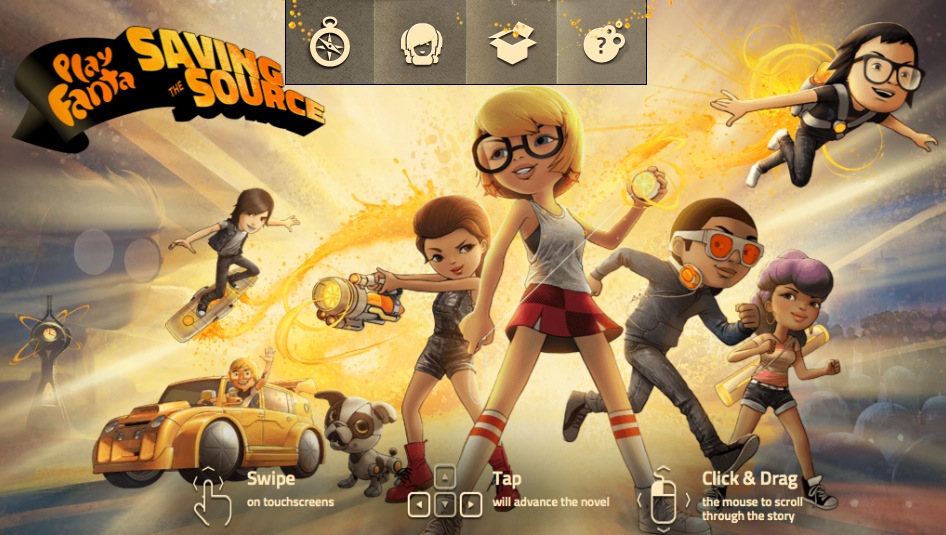
Another best interactive hypercomic website produced by Fanta. Some of the graphics effects and panels has inspired me.

Saturday, November 15, 2014

Japanese culture/element

Just to clarify , in my final project what is the Japanese culture that used and introduce for user.

Cat (Neko):

In Japanese folklore, cat that have protective powers and symbolize good fortune. (CARMINA,L ,2013). I think that is why Japan nowadays anime character are mostly in cat form, such as Doraemon, Hello Kitty and so on.

In my project, this culture will be introduce in the first dream in chapter 2. When the kids grabbing the cat from the mask character because they want to have good luck. 

One of the scene in Chapter 2


Faceless ghost (Noppera-bo):

Another interesting folklore in Japan is this faceless ghost. Noppera-bo is a Japanese legendary creature that usually in human form and appear in front the victim before erase their face features to scare them. 

Image from:http://media.japanpowered.com/images/Ryoi_Nopperabo1.jpg

Andrew Kincaid (2013), has noted in his article about Noppera-bo. This faceless ghost are apparently harmless. They love scare and crap out of unsuspecting people. There is no reason of why they are doing this but they are often appear in human form and often as someone who is familiar to their potential victim. 

However I have implement this to mix with Kabuki in my project. Click Here to view Kabuki post.


Others:

Kakemono (scroll painting):

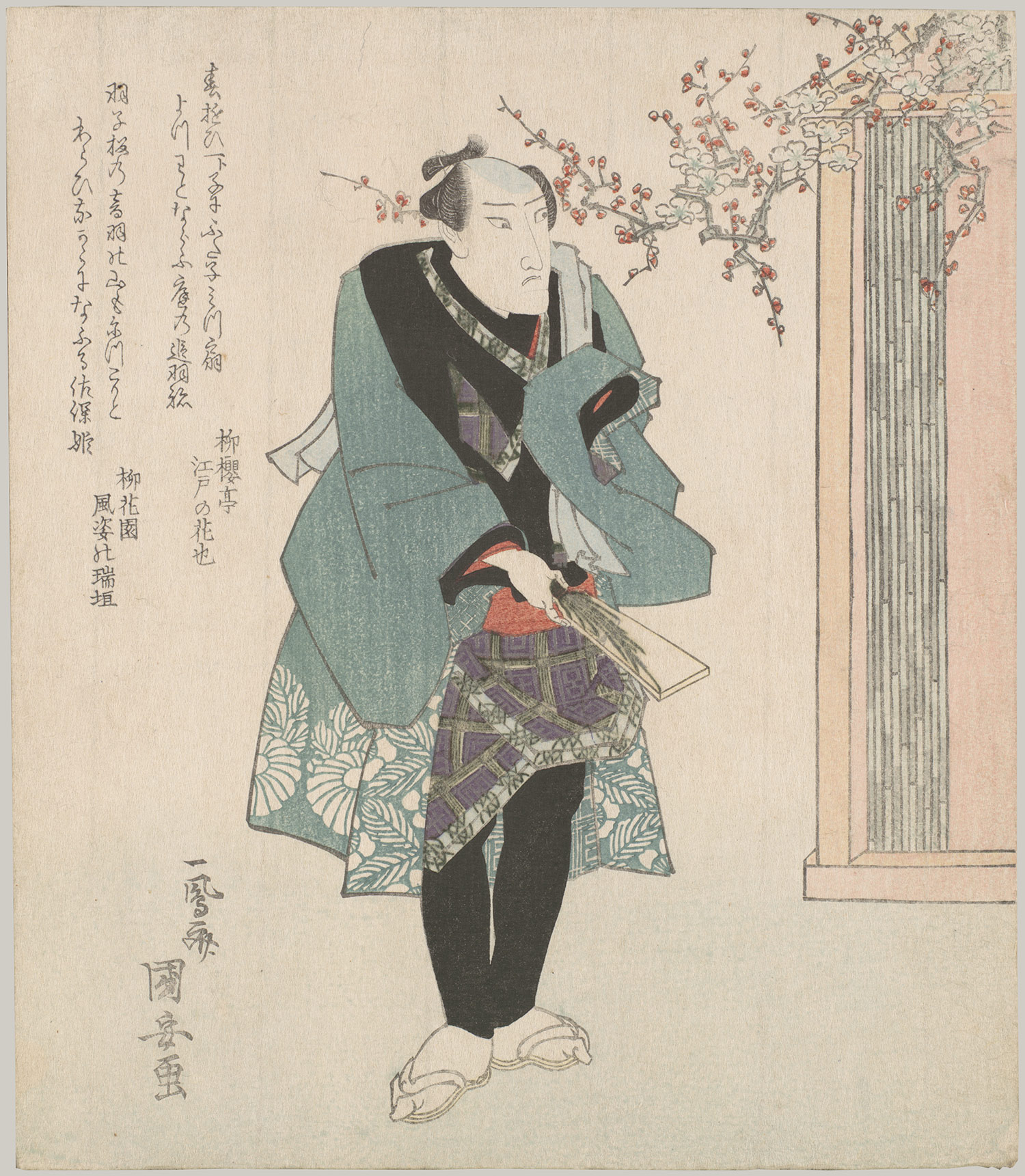
Other than that, I'm using the scroll painting method in Chapter 1 when introduce to Baku's childhood. The overall mood will looks like Ukiyo-e wood print style(image below).

Image from:http://www.metmuseum.org/toah/images/h2/h2_2001.715.4.jpg

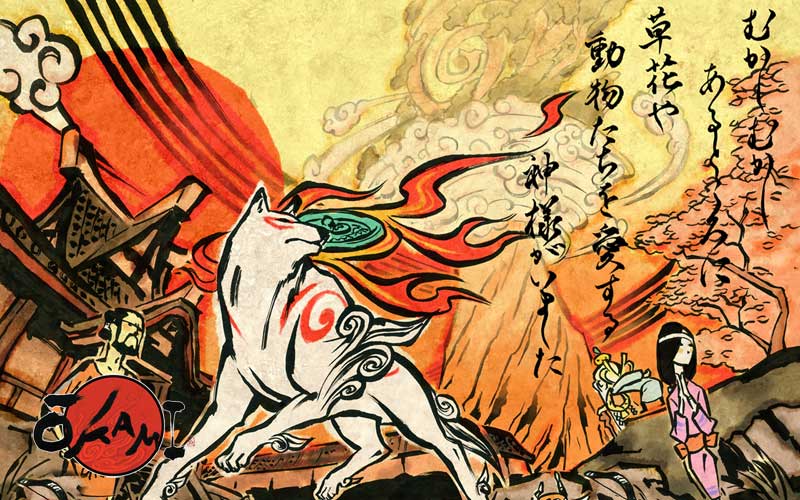
While the artstyle stroke will be using Okami art(Image below)

Image from: http://www.artofokami.com/wallpaper.php
The reason of mixing this is to form a reminiscence mood with the Japan visual to attract user in the narrative.


Reference:


Artofokami.com, (2006). Okami Art. [Online Image] Available at: http://www.artofokami.com/wallpaper.php [Accessed 10 Jul. 2014].

Carmina, L. (2013). 31 Pictures That Show Japan's Crazy Obsession With Cats. [Online] Business Insider. Available at: http://www.businessinsider.com/japan-is-obsessed-with-cats-2013-7?IR=T&op=1#ixzz3IqyPHFSh [Accessed 17 Jul. 2014].

Kincaid, A. (2013). Noppera-bo, the Faceless Ghost. [Online] Japan Powered. Available at: http://www.japanpowered.com/japan-culture/noppera-bo-the-faceless-ghost [Accessed 17 Jul. 2014].